
GTA Lockman Mobile Locksmith Services · Toronto & GTA
Keypad Lock Installation for Homes
Plan keyless entry around door compatibility, code management and a practical backup entry method.
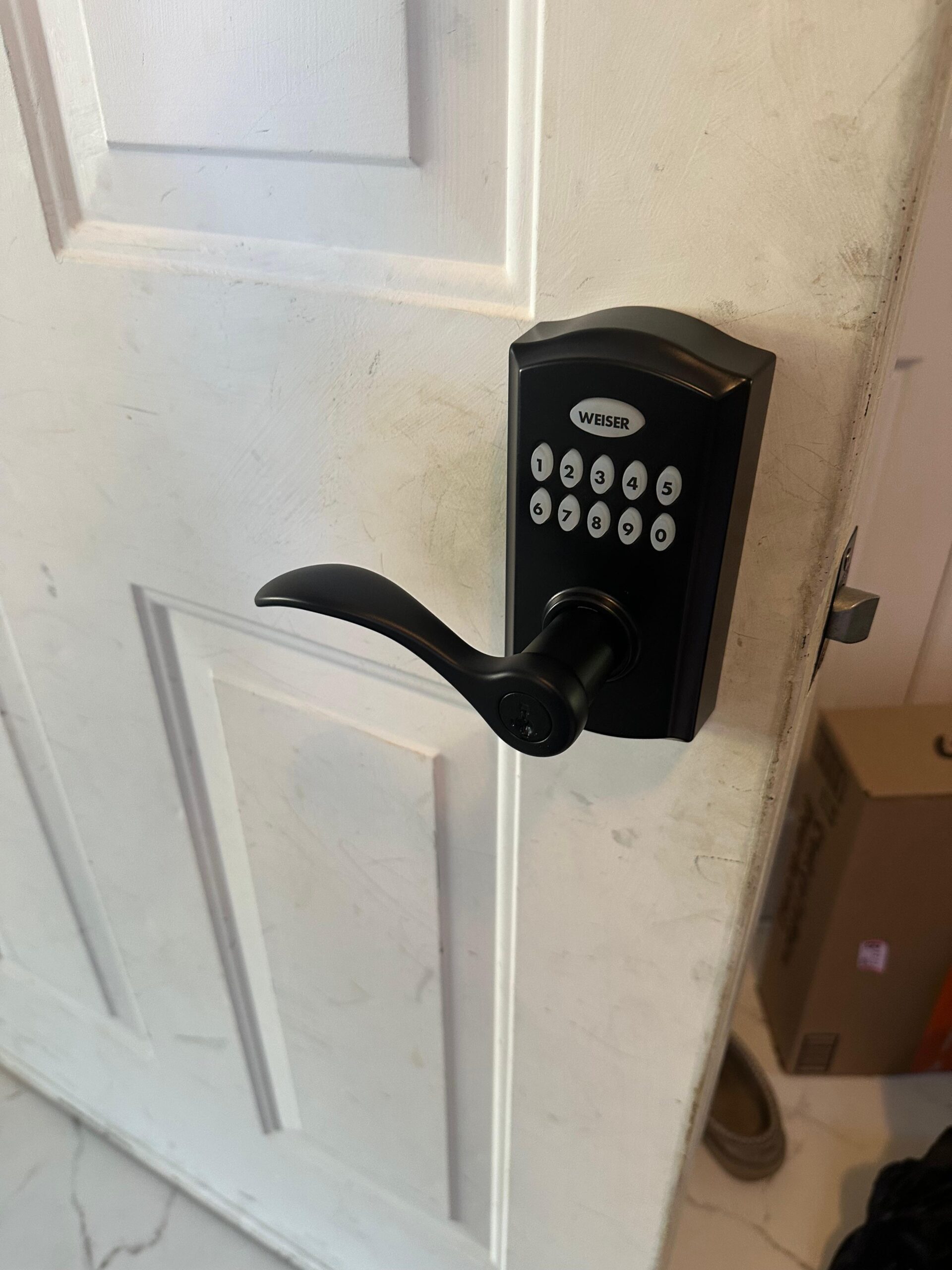
Choose the entry function before the product
A keypad lock lets an authorized person use a code, but keypad products differ in how they operate and what they require. Some work locally without remote connectivity. Others include connected features through supported accounts or additional equipment. Decide whether the household needs keyless local entry, separate visitor codes or remote administration before comparing products.
GTA Lockman Mobile Locksmith Services assesses the physical door and compatible hardware as part of installation. The product must suit the opening, not simply the preferred finish. Provide photographs of both sides, the edge and any nearby glazing or trim. Include the exact model if you have already purchased a lock.
The existing residential locksmith service includes other household hardware work that may be relevant. If the door is already difficult to latch or lock, identify that condition before planning the keypad. An electronic motor should not be used to compensate for an opening that needs a mechanical correction.
Keypad, smart lock and mechanical keyless hardware
The word keyless does not identify a single technology. An electronic keypad uses powered controls, while some mechanical code locks use a different arrangement. Connected products add supported communication and account features. Confirm the actual functions of the chosen model rather than relying on its marketing category.
Consider who will manage users and how often access changes. A household giving a cleaner occasional entry may have different needs from a rental property with changing occupants. Features such as individual codes or scheduling are model-dependent, and should be verified before they are promised as part of the installation.
Also consider maintenance and recovery. Identify the manufacturer's power guidance and supported backup entry method. A lock without the features you assumed it had can create an avoidable management problem after fitting. Keep the specification and product instructions with the household records.
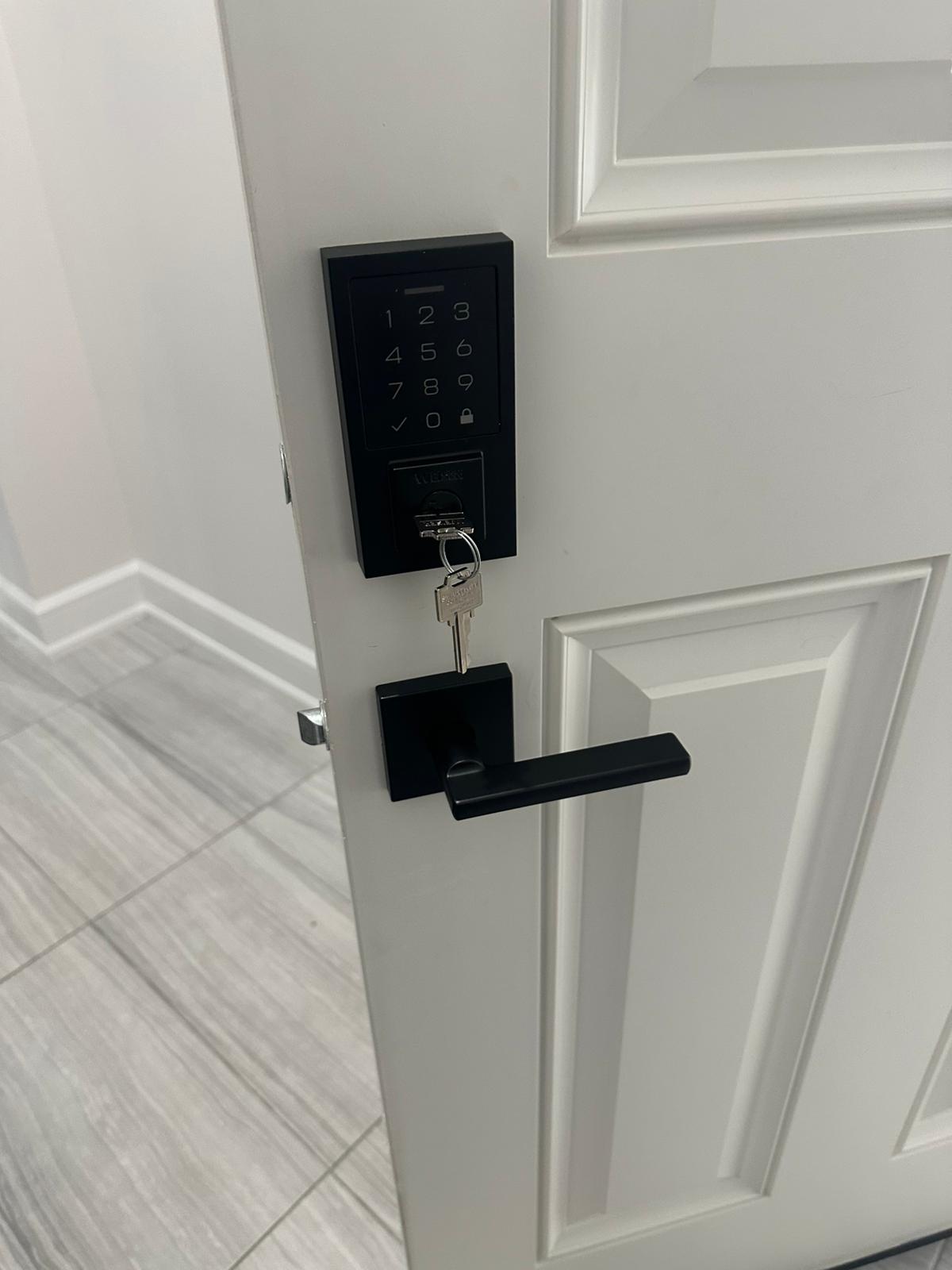
Door preparation and clearance
Existing bore holes, door thickness, backset and mounting arrangement affect compatibility. The inside housing may occupy more space than a conventional thumbturn. Nearby glazing, a narrow stile, decorative trim or another door can limit clearance. These details matter even where the outside unit appears to fit.
Do not enlarge holes or remove material before the product and opening have been assessed. A modification may affect the door's suitability or make alternative hardware harder to fit. For a replacement handleset, our front-door hardware page explains why trim coverage and existing fixing points also deserve attention.
Where a door uses multipoint or another specialized mechanism, identify that system first. A standard electronic deadbolt may not be an appropriate substitute. The intended operation of the whole door must remain the basis for the installation, with model-specific compatibility confirmed rather than assumed.
Alignment before electronic setup
The bolt or latch should operate smoothly under normal closed-door conditions. A door that needs lifting, pulling or force to lock requires assessment of the hinges, strike and fit. Installing a motorized unit over that resistance can leave the new device struggling with the same physical problem.
During fitting, the inside and outside components need to align correctly without excessive mounting pressure. Tightening screws does not correct an unsuitable connection or distorted preparation. The technician should test the mechanical operation before treating the setup procedure as complete.
After calibration or supported setup, repeat the closed-door test. An electronic confirmation should correspond to actual bolt movement. Our smart lock troubleshooting page describes why keypad lights and app status are only part of assessing whether the opening is functioning correctly.
Code ownership and user management
Choose an authorized administrator for the lock. That person should know how to add and remove users through the supported controls and where to keep recovery information. Do not put PINs or administrator credentials in public photographs, shared invoices or an openly accessible property note.
Where the model supports individual codes, assign them deliberately rather than sharing one permanent code among everyone. Remove access when it is no longer needed. Explain the distinction between a user code and an administrator credential to the people responsible for the property.
A connected model may require an account handover if the property changes occupants. A new Wi-Fi password or new mechanical override key does not necessarily remove existing users. Follow the manufacturer's ownership-transfer process and record any provider action still outstanding.
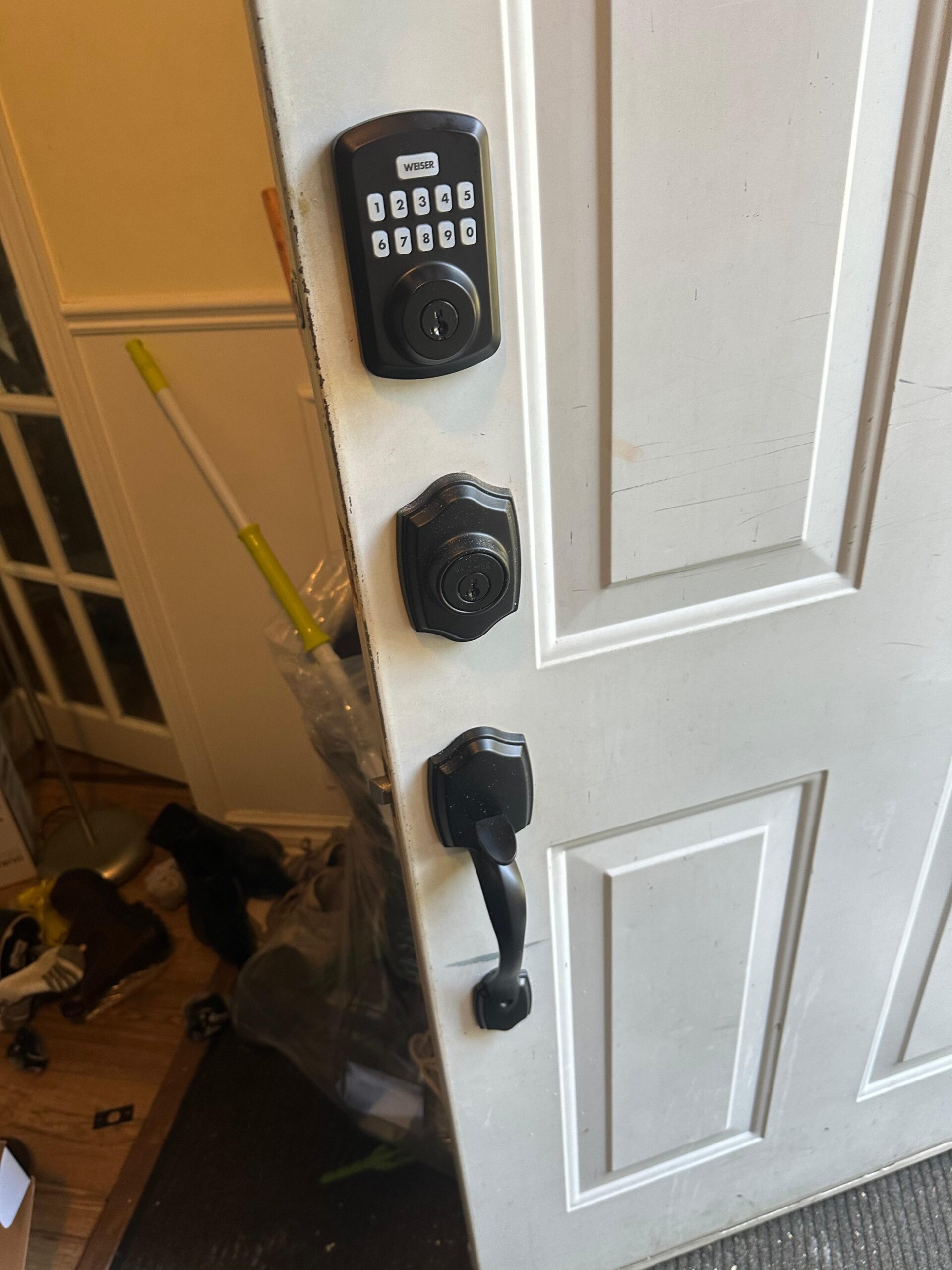
Backup access and batteries
Confirm the backup method for the actual model. Some products include a mechanical cylinder; others provide different supported arrangements. Keep an authorized spare or recovery method available as appropriate, without assuming that a phone app will remain usable under every power or communication condition.
Follow the specified battery guidance and respond to repeated warnings. Keep the model information accessible to the administrator so maintenance does not depend on remembering an online demonstration. Avoid applying instructions for a similar-looking product without confirming they apply to this one.
If no supported entry method works while the door is locked, that is an access service rather than routine setup. Our smart-lock lockout page explains the information to provide. Factory-resetting a locked device without understanding the consequences can create another problem instead of restoring entry.
Condos, rentals and shared entrances
Building management may control the hardware permitted on a condo suite entrance. Obtain the required appearance, function and modification rules before buying a keypad lock. Physical fit alone does not establish that the product is suitable for the assembly.
For rental premises, identify who authorizes installation and who owns the administration account. Agree on the required access arrangement through the appropriate process. The locksmith should not be asked to decide a dispute about who can enter or change codes.
For a shared entrance, consider whether one household should be able to administer the entire device. A keypad convenience feature is not a substitute for a clear access policy. Where management requires a particular system, document that requirement before installation options are discussed.
Complete the handover at the door
Test ordinary closing, locking and interior release with the responsible person present. Demonstrate supported code entry and user administration without exposing private credentials. Check the backup method and any connected functions included in the installation separately.
Keep the product model, invoice, instructions and authorized account information in appropriate private records. Note any feature that requires manufacturer setup or a separate service. A successful installation includes a usable door and an understood management routine, not merely a powered keypad fixed to the outside trim.
Choose the function for the particular opening
A keypad on a main entrance and one on an internal office can have different access needs. The main entrance may be used by all household members and visitors, while the office may need a narrower user group. The selected hardware must also suit the door and intended release function.
Describe those needs before choosing a product by appearance or advertised features. If the opening belongs to a managed building, establish its requirements first. Compare supported administration and backup methods alongside physical fit. After the choice is made, define the installation scope: hardware, any fitting work, local setup and any separate provider responsibilities. Keep that scope with the service record. This makes it possible to confirm that the agreed result was delivered without confusing an installed keypad with a fully administered connected system or an unresolved door-alignment repair.
Questions about keypad lock installation for homes
Is a keypad lock always a connected smart lock?
No. Some products provide local code entry, while others add app, network or remote-service features. Decide which functions the household actually needs before choosing a model. Connected features can add account and communication requirements that a local keypad may not share. The door still needs compatible preparation and free mechanical movement in either case. Ask about the supported backup entry method and who will administer users. Selecting the desired access function first makes it easier to compare suitable hardware instead of treating every product with numbered buttons as the same type of system.
Can a keypad be installed without replacing the handle?
Some separate deadbolt products may work with a retained latching handle, while integrated keypad levers replace a different part of the assembly. Compatibility depends on the actual opening, spacing and product format. Send photographs of the full hardware arrangement and the door edge. Explain whether you want to retain the finish or operating function of the existing handle. The assessment should identify which components remain and which change. A similar exterior footprint does not establish clearance for the interior housing or confirm that the new latch or bolt fits the existing preparation.
What should we decide about household codes?
Identify the authorized administrator and the people who need access. Where the product supports individual users, consider whether separate codes would make changes easier to manage than a single shared code. Product capabilities vary, so do not assume schedules or temporary access are available on every model. Keep codes and recovery information private and follow the manufacturer's administration guidance. The installation handover should show the supported process for adding and removing users without exposing those credentials in a public record. A keypad is easier to maintain when responsibility for its users is clear from the start.
Will the keypad work if our internet connection fails?
That depends on the product and which function you mean. A model may retain local code operation while losing a remote feature, but this must be checked against its documentation. Do not select a lock based on a general assumption about all connected devices. Discuss the entry methods the household will rely on and the supported fallback for power or communication problems. The handover should distinguish local operation from any app or remote feature. Testing one function does not establish that every other feature or recovery method is available under the same conditions.
Can we supply a lock purchased elsewhere?
Provide the exact model, available components and photographs of the door before arranging installation. A product can be new and still be incompatible with the existing preparation, thickness or intended function. Missing parts or a product designed for a different arrangement may affect the scope. The assessment should establish what can be installed and whether additional door work is appropriate before assumptions are made about the visit. Keep the manufacturer's instructions and purchase information. If the device requires account setup, the authorized owner should be available to manage credentials privately.
What if the door currently needs a hard pull to lock?
Address that condition during the installation assessment. A motorized bolt or latch should not be used to overcome unresolved pressure from alignment or weather stripping. The cause may involve the strike, hinges, door position or existing hardware. Tell the locksmith how operation changes with the door open and closed, without forcing it. The proposal may need to include a fitting correction before the electronic product is reliable in normal use. A successful keypad response with the door open is not enough to verify a completed installation on an opening that still binds when closed.
Is a mechanical backup key required for every keypad?
Products use different supported recovery arrangements, and some have no conventional key cylinder. Understand the exact model before deciding whether its backup method suits your household. Consider who can use that method and where any necessary authorized spare or information will be kept. Do not rely solely on a phone that may be unavailable during an access problem. The installer should explain the supported controls included in the product instructions, without promising that one method applies to every device. A clear fallback plan is part of selection, not a detail to discover after a lockout.
What needs to be demonstrated after installation?
Check normal closing, intended bolt or latch travel, inside release and each agreed local entry method. Where supported remote functions are included, test them separately from the mechanical operation. Confirm how the authorized administrator manages users and follows battery guidance. Keep credentials private and record the product model and any outstanding provider task. If the key arrangement changed, identify which household doors remain on other keys. A useful handover shows how the installed product works in the actual door, including normal closed-door operation, rather than only demonstrating that the keypad lights up.
Plan your locksmith visit
Describe the door, hardware and service address. Contact GTA Lockman Mobile Locksmith Services to confirm the scope and scheduling for your location.
Friday: 8:30 AM–4:00 PM
Sunday: 9:30 AM–9:00 PM
Saturday: closed